
Why 70% of Leads Fail Without CRM Automation (and How to Fix It)
You are spending thousands of dollars on ads. Your team is working late every night. Yet, for some reason, your sales numbers just aren't moving. It feels like you are pouring water into a leaky bucket, doesn't it? The truth is that manual work is killing your growth. When a lead comes in, they expect a reply in minutes, not hours. If you're still typing out every email by hand, you've already lost the race.
This is where crm automation changes everything. It is the secret weapon that turns a chaotic inbox into a streamlined money-making machine. We have seen businesses double their closing rates just by fixing their follow-up speed. In this guide, we will show you exactly why leads are failing and how you can use technology to fix it once and for all.
CRM Automation: What It Is, Benefits & How It Works in 2026
In the modern world of business, speed is the only currency that matters. You cannot afford to wait until Monday morning to respond to a Friday night inquiry. That lead will be gone. They will find your competitor who has their systems dialed in. Automation is no longer a luxury; it is the baseline for staying alive in 2026.
We live in an age where customers want instant gratification. If they fill out a form, they want a confirmation. They want to know someone saw them. An automated crm system makes sure that happens every single time. It acts like a digital employee that never sleeps, never takes a lunch break, and never forgets to follow up.
When we look at how these systems work, it is all about triggers. A customer does something, and your software reacts. It is a simple chain reaction that keeps your sales pipe full. It removes the guesswork from your day. You stop wondering who to call next and start focusing on closing the deals that are ready to sign.
What Is CRM Automation?
CRM Automation Definition in Simple Terms
CRM automation is the process of using software to handle the boring, repetitive parts of sales and marketing. Instead of you clicking "send" on every email, the system does it. According to IBM's research on automation, it is primarily about connecting your different business tools. It allows data to flow from your website directly into your sales records without any manual typing.
What Tasks It Automates
This software can handle almost anything that follows a pattern. It tracks when people open your emails and reminds you to call them. It can update a lead's status from "New" to "Interested" based on their actions. It even sends out birthday greetings or renewal reminders. These small tasks add up to hundreds of hours saved every single year for your team.
CRM Automation vs Traditional Manual CRM
A traditional CRM is just a digital filing cabinet. You have to put the files in yourself. If you forget to update it, the data becomes useless. An automated system is different because it updates itself. It watches what your customers are doing and records it. This means your data is always fresh, accurate, and ready for you to use in your next big meeting.
What Is an Automated CRM System?
Building on that definition, let's look at how the actual system lives and breathes within your company. An automated crm system is the engine behind your customer relationships. It doesn't just store names; it manages the journey those names take. It creates a path for every prospect to follow from the moment they find you until they buy.
Think of it as a series of "If This, Then That" statements. If a lead clicks a link in your newsletter, then the system tags them as a "Hot Prospect." If they haven't replied in three days, then the system sends a polite nudge. This logic ensures that your brand stays top-of-mind without you having to set a single calendar reminder.
This fits into your sales process by removing the friction. Your reps don't have to spend 40% of their day on data entry anymore. They can spend that time talking to people. Forbes highlights that many marketing tools fail when they aren't properly integrated into the actual human workflow of the company. A good system supports the human; it doesn't replace them.
Benefits of CRM Automation
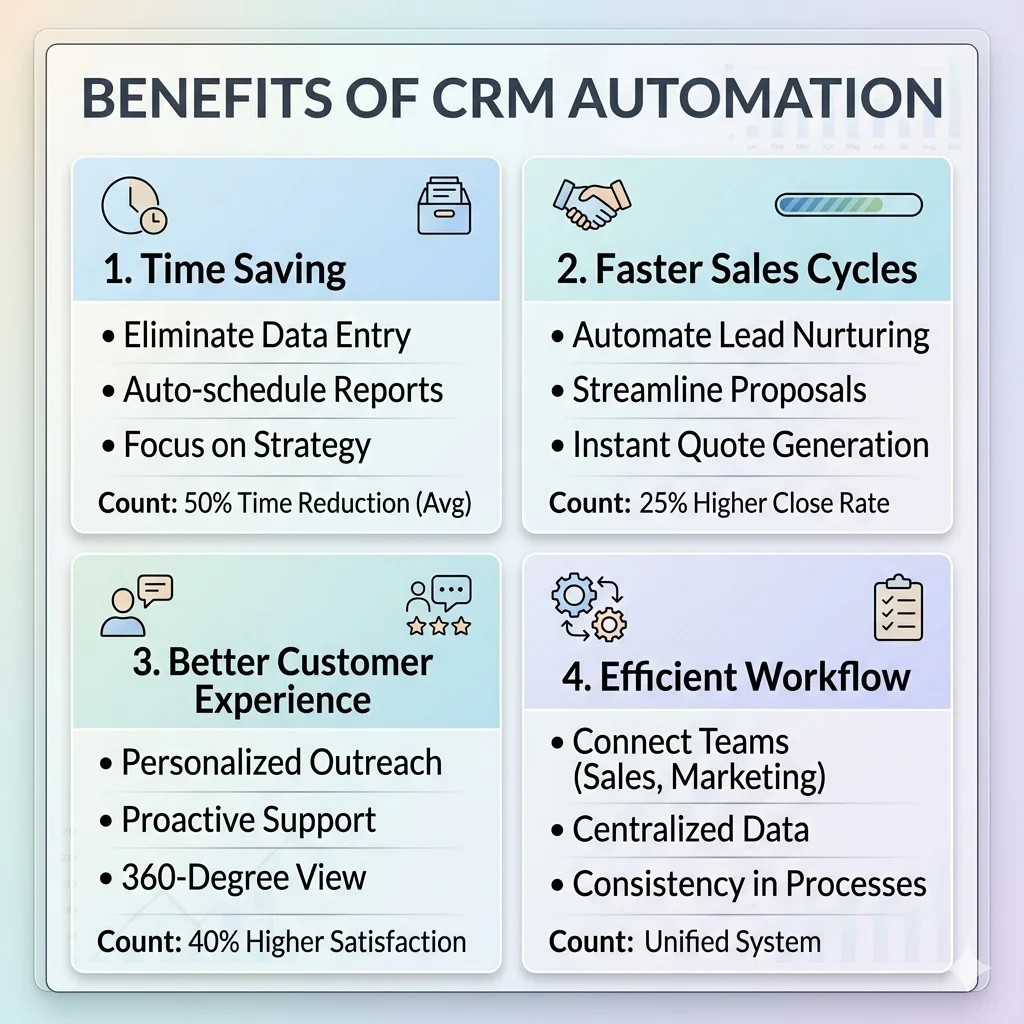
Moving from manual to automated processes is like moving from a bicycle to a jet engine. You get to your destination faster and with much less effort. Here are the core reasons why businesses are making the switch:
Massive Time Savings: You stop doing data entry and start doing high-value work.
Zero Human Error: Machines don't forget to send emails or misspell customer names.
Faster Sales Cycles: Automated nudges move leads through the funnel much quicker.
Happier Customers: People love getting fast responses and personalized attention.
Scalability: You can handle 1,000 leads as easily as you handle 10.
Better Insights: Real-time data tells you exactly which ads are actually making you money.
What CRM Functions Should You Automate?
Lead Management and Scoring
Not all leads are created equal. Some people are just browsing, while others have their credit cards out. Automation helps you score these leads based on their behavior. You can set up rules so that your best sales reps only get the "hot" leads. This ensures your most expensive talent isn't wasting time on people who aren't ready to buy yet.
Follow-up Emails and Sequences
The fortune is in the follow-up, but most people stop after one or two tries. Automation allows you to build a 10-step sequence that runs on its own. You can share helpful tips, case studies, and testimonials over several weeks. This builds trust with the prospect automatically. By the time they pick up the phone, they already feel like they know your brand.
Reporting and Analytics
Stop guessing how your business is doing. Automated reporting pulls data from every corner of your CRM to show you the truth. You can see your conversion rates, your average deal size, and your team's performance at a glance. This lets you make decisions based on cold, hard facts instead of just a "gut feeling" that might be wrong.
CRM Automation Examples in Real Business Scenarios
To make this real, let's look at how this looks in the wild. These are common crm automation examples that we set up for our partners at SimplifiChaos to help them reclaim their time.
Instant Welcome: A new lead submits a form and immediately receives a text with a booking link.
The Re-Engagement: A lead who hasn't been active for 30 days gets a special "We miss you" offer.
Onboarding Magic: Once a contract is signed, the system automatically sends the first invoice and a welcome kit.
Task Triggers: When a deal moves to the "Proposal" stage, a task is created for the manager to review it.
Meeting Reminders: The system sends a reminder 24 hours and 1 hour before a Zoom call to reduce no-shows.
Case Study: Turning Chaos into Growth
Let’s share a quick story about a client who came to us. They were a mid-sized service provider struggling with messy spreadsheets. When this client approached us at SimplifiChaos with similar concerns, we implemented a custom crm workflow automation strategy. They were losing nearly half of their inquiries because their staff simply couldn't keep up with the volume of emails.
We automated their initial lead capture and set up an AI-driven lead scoring system. AI is currently supercharging orchestration by predicting which customers are most likely to churn. In just four months, their lead-to-close ratio improved by 38%. They didn't hire any new staff; they just made their existing team much more efficient using the right tools.
How to Choose the Right CRM Automation Software
Choosing software can feel overwhelming because there are so many options. You shouldn't just pick the one with the most features. You need to pick the one that your team will actually use. If it is too complicated, they will go back to using sticky notes and spreadsheets. Look for a platform that has a clean interface and connects to the tools you already use daily.
Check for a "no-code" builder. This allows you to create automations without being a computer genius. You also want to make sure it can grow with you. A tool that works for 5 people might break when you have 50. Scalability is the key to long-term success. Always ask about the support team and the training resources they offer before you sign a long-term contract.
Lastly, consider the mobile experience. Your sales team is often on the go. They need to be able to see their automated tasks and lead updates from their phones. If the mobile app is clunky, it will slow them down. A great CRM should feel like a natural extension of your workflow, not an extra chore that you have to complete at the end of the day.
How to Set Up CRM Automation in Your Business
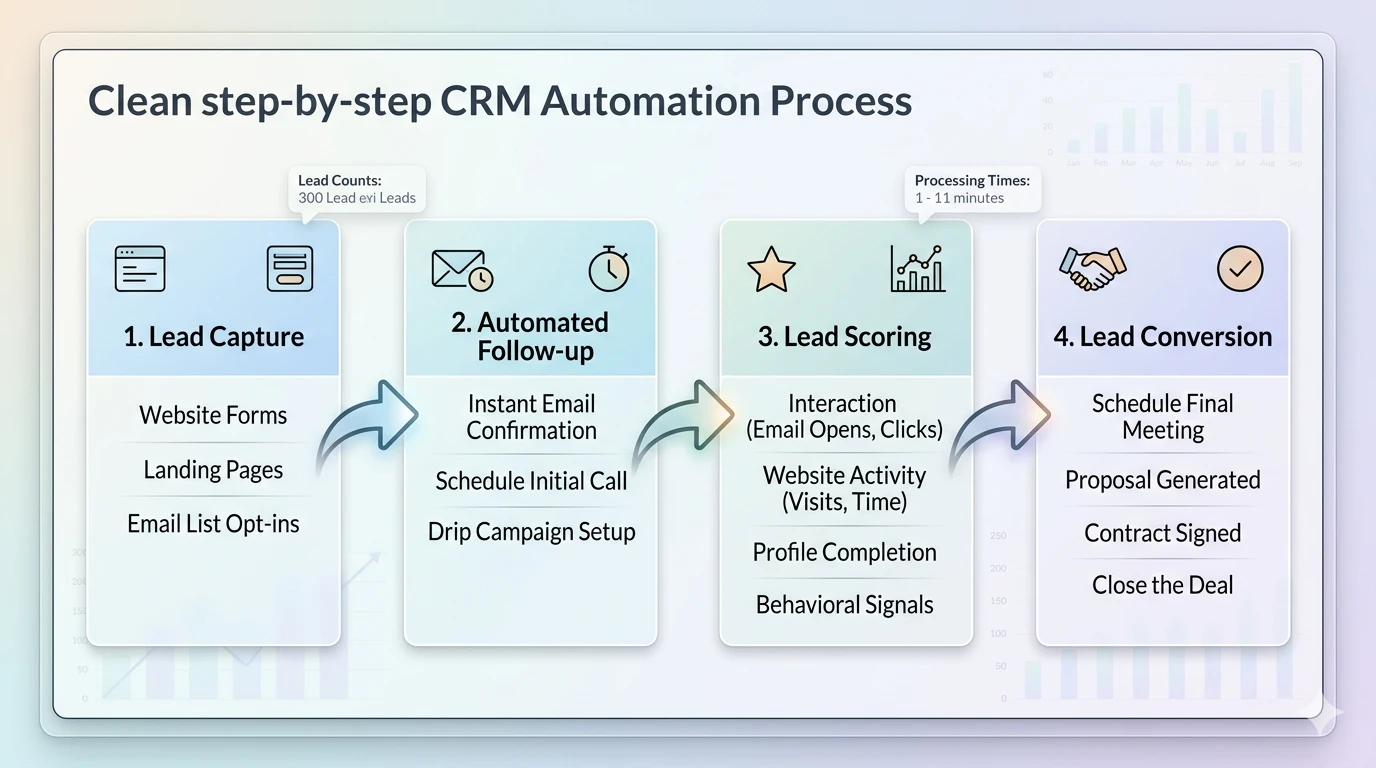
Setting up your first automation doesn't have to be scary. You just need to follow a simple, logical process. Don't try to automate everything at once, or you will get confused. Start with the one task that annoys you the most every day.
Map Your Workflow: Draw out every step of your current sales process on a piece of paper.
Identify Bottlenecks: Circle the parts where things usually slow down or get forgotten.
Choose Your Triggers: Decide what action should start the automation (like a form submission).
Build and Test: Set up the automation in your software but send the emails to yourself first.
Launch and Refine: Turn it on for real customers and watch the data to see where it can be better.
CRM Automation Trends to Watch in 2026
AI-Powered Lead Scoring
Artificial intelligence is getting smarter every day. In 2026, we are seeing systems that can predict a lead's budget just by how they browse your site. This allows you to focus your energy on high-value targets. It is like having a crystal ball for your sales pipeline that gets more accurate the more you use it.
Predictive Sales Forecasting
Instead of looking at what you did last month, automation now tells you what you will do next month. It looks at your current pipeline and the speed of your deals. It then gives you a highly accurate prediction of your future revenue. This helps you make better hiring and spending decisions without the stress of uncertainty.
Hyper-Personalized Email Automation
Generic blast emails are dead. The new trend is using data to make every email feel like it was written by a friend. The system can mention the specific pages a lead visited or the exact problem they mentioned in a chat. This level of detail makes people much more likely to reply and engage with your brand.
Wrapping Things Up
CRM automation is the bridge between a struggling business and a thriving one. By removing the manual burden from your team, you give them the space to do what they do best: build relationships. You stop losing leads to the cracks and start building a reputation for excellence and speed. It is time to stop working harder and start working smarter.
If you want to stop the leak in your sales bucket, we can help. Visit SimplifiChaos to see how our team transforms sales processes into automated machines that drive real growth.
FAQs
What is CRM automation, and how does it work?
CRM automation uses software to perform repetitive tasks within the customer relationship management process. It works by using "triggers" (like a lead filling out a form) to kick off "actions" (like sending a welcome email). This ensures that your sales process moves forward without needing a human to manually trigger every single step.
What are the benefits of CRM automation for businesses?
The main benefits include massive time savings, reduced human error, and faster response times to leads. It also helps businesses scale without needing to hire more administrative staff. By using an automated crm system, companies can provide a more consistent and personalized experience for every single customer in their database.
What are the best examples of CRM automation?
Common examples include automated lead assignment to sales reps, instant email follow-ups after a form submission, and automated meeting reminders. Other powerful examples include lead scoring, where the system ranks prospects based on their behavior, and automated re-engagement campaigns for customers who haven't purchased in a while.
How do I choose the right CRM automation software?
You should look for software that is easy to use, integrates with your current tools (like email and calendar), and offers a no-code automation builder. It is also important to choose a platform that is scalable so it can grow with your business. For more advice on picking the right partners, check out our guide on good digital marketing agency traits.
How can I start implementing automation today?
Start by mapping out your current sales journey and identifying the most repetitive tasks. Pick a user-friendly CRM and set up one simple automation, such as an auto-reply for new inquiries. Once that is working, you can gradually add more complex workflows. If you have questions, feel free to check our FAQs or contact us directly for help.


